Record, replay, relax.API testing a Go app with Keploy
- Beginner
- ~20 min hands-on
- Go · Gin · MongoDB
- Linux / WSL 2
You have a Go API. It works. You should have tests for it, but writing them by hand means crafting request payloads, asserting on responses, and mocking out the database, which is often more code than the handlers themselves.
In this tutorial you'll let Keploy write those tests for you. You'll run a small Gin + MongoDB app, use it like a normal user for a minute, and walk away with a replayable test suite that doesn't even need the database to run.
TL;DR
The whole loop, in three commands
The rest of this page explains each one.
- 1
Record · Keploy starts your app and captures traffic.
sudo -E env PATH="$PATH" keploy record -c "go run main.go handler.go" - 2
Use your API · Every request becomes a test case.
curl -X POST localhost:8080/url -H 'content-type: application/json' -d '{"url": "https://google.com"}' - 3
Replay · Keploy re-sends the requests and mocks MongoDB.
sudo -E env PATH="$PATH" keploy test -c "go run main.go handler.go" --delay 10
What is Keploy?
Keploy is an open-source testing tool that generates API tests from real traffic. Instead of writing a test, you use your API while Keploy watches. It saves two things:
- Test cases: each request that hit your app, plus the response your app sent back.
- Mocks: each call your app made to its dependencies (here, MongoDB) and what came back.
Later, Keploy replays those requests against your app and answers the database calls itself using the saved mocks. If your app's response still matches what was recorded, the test passes. If something changed, you get a diff.
You (curl)
send real requests
Gin app
runs normally on :8080
MongoDB
the real database
- 1Keploy starts your app for you and watches its network traffic. No code changes, no SDK.
- 2Every API call you make becomes a test case: the request plus the response your app sent back.
- 3Every call your app makes to MongoDB is saved as a mock, so the test won't need the database later.
Why this is useful for a Go developer
- No test code to maintain. Your handlers can change shape; you just re-record.
- No test database. Mocks stand in for MongoDB, so tests are fast and don't depend on local state.
- No SDK or code changes. Keploy works at the network level, so your
main.gostays exactly as it is. - Real-world inputs. The tests use requests you actually sent, not ones you imagined while writing a test.
Before you start
Keploy captures traffic using Linux kernel features, so it runs on Linux or, on Windows, inside WSL 2. I did this whole tutorial from an Ubuntu shell in WSL on Windows 11.
| Tool | Why you need it | Check it with | What I used |
|---|---|---|---|
| Linux or WSL 2 | Keploy needs a Linux kernel (5.10+) | uname -r | Ubuntu 24.04, kernel 6.6 |
| Go | Builds and runs the sample app | go version | 1.27.1 |
| Docker | Runs MongoDB in a container | docker --version | 29.2.1 (Docker Desktop) |
| Git | Clones the sample app | git --version | 2.43 |
Meet the sample app
The quickstart uses a tiny URL shortener from Keploy's samples-go repository. It's a Gin HTTP server on port 8080 that stores URLs in MongoDB. Gin prints its routes on startup:
[GIN-debug] GET    /:param                   --> main.getURL (3 handlers)
[GIN-debug] POST   /url                      --> main.putURL (3 handlers)
[GIN-debug] GET    /verify-email             --> main.verifyEmail (3 handlers)
We'll use the first two:
| Method | Path | What it does |
|---|---|---|
POST | /url | Takes a long URL, stores it, returns a short link |
GET | /:param | Looks up a short code and redirects (303) to the original URL |
That MongoDB dependency is what makes this sample a good first choice: it lets you see Keploy's mocks in action, not just its HTTP recording.
Set up and run the app
Clone the sample
samples-go holds dozens of samples, and a full clone was slow for me. This fetches only the gin-mongo folder:
git clone --depth 1 --filter=blob:none --sparse https://github.com/keploy/samples-go.git
cd samples-go && git sparse-checkout set gin-mongo && cd gin-mongo
go mod download
Why: go mod download fetches the app's Go dependencies up front, so the first keploy record doesn't stall on downloads.
Move the shipped recordings aside
The repo already contains a keploy/ folder with someone else's recordings. Rename it so your own run starts clean:
mv keploy keploy-shippedPoint the app at your local MongoDB
Open main.go. On line 35 the app connects to a host called mongoDb, the service name it uses inside Docker Compose. Change it to localhost:
client, err := New("localhost:27017", dbName)Why: you'll run the Go app directly with go run, outside Docker, so it has to reach MongoDB through the port Docker publishes on localhost.
Start MongoDB
The compose file expects a Docker network called keploy-network to already exist. Without it, you get:
network keploy-network declared as external, but could not be foundCreate the network once, then start only the database:
docker network create keploy-network
docker compose up -d mongo Container mongoDB Created
Container mongoDB Starting
Container mongoDB StartedWhy: only the database runs in Docker. The Go app runs on your machine, where Keploy can watch it.
Sanity-check the app without Keploy
Start the app:
go run main.go handler.goThen, in a second terminal, shorten a URL:
curl --request POST \
  --url http://localhost:8080/url \
  --header 'content-type: application/json' \
--data '{"url": "https://google.com"}'{"ts":1790780912668271014,"url":"http://localhost:8080/Lhr4BWAi"}Why: if something's broken at this point, it's not Keploy's fault. Confirming the app works on its own makes any later error much easier to place.
Stop the app with Ctrl+C. Keploy will start it for you in the next section. Leave MongoDB running.
Install Keploy
I installed the open-source build straight from Keploy's GitHub releases. It needs no sudo, and the binary lands in your home directory:
mkdir -p ~/.keploy/bin
curl -fsSL "https://github.com/keploy/keploy/releases/latest/download/keploy_linux_$(dpkg --print-architecture).tar.gz" | tar xz -C /tmp
install -m 0755 /tmp/keploy ~/.keploy/bin/keploy
echo 'export PATH="$HOME/.keploy/bin:$PATH"' >> ~/.bashrc && source ~/.bashrc
Check that it worked:
keploy --versionKeploy 3.6.82Record your first tests
Start Keploy in record mode
From the gin-mongo folder:
sudo -E env PATH="$PATH" keploy record -c "go run main.go handler.go"Why: -c is the command Keploy uses to start your app. Keploy launches it and hooks into its network traffic, so you don't touch the app's code. On the first run it also creates a keploy.yml config file next to your code.
When you see the agent is ready and Gin has printed its routes, Keploy is recording:
🐰 Keploy: ... INFO    Keploy agent is ready to record test cases and mocks.
🐰 Keploy: ... INFO    Starting Application :  {"executing_cmd": "/usr/bin/sh -c go run main.go handler.go"}
[GIN-debug] GET    /:param                   --> main.getURL (3 handlers)
[GIN-debug] POST   /url                      --> main.putURL (3 handlers)
[GIN-debug] GET    /verify-email             --> main.verifyEmail (3 handlers)
🐰 Keploy(agent): ... INFO Started ingress forwarding {"orig_port": 8080, "new_port": 43463}Use the app
With Keploy running, send requests from a second terminal. Shorten two URLs:
curl --request POST \
  --url http://localhost:8080/url \
  --header 'content-type: application/json' \
  --data '{"url": "https://google.com"}'
curl --request POST \
  --url http://localhost:8080/url \
  --header 'content-type: application/json' \
--data '{"url": "https://github.com"}'{"ts":1790781506903043746,"url":"http://localhost:8080/Lhr4BWAi"}
{"ts":1790781506914908121,"url":"http://localhost:8080/4KepjkTT"}Follow a short link, and try one that doesn't exist:
curl -i http://localhost:8080/Lhr4BWAi
curl -i http://localhost:8080/doesNotExistHTTP/1.1 303 See Other
Location: https://google.com
HTTP/1.1 404 Not Found
{"error":"url not found"}Stop recording
Press Ctrl+C in the Keploy terminal. Your tests are now saved to disk.
Look at what Keploy generated
keploy/
└── test-set-0/
    ├── mocks.yaml
    └── tests/
        ├── get-doesnotexist-1.yaml
        ├── get-lhr4bwai-1.yaml
        ├── post-url-1.yaml
        └── post-url-2.yaml
Each request became one test file, named after its method and path. Here's the first POST, trimmed to the important parts:
kind: Http
name: post-url-1
spec:
  req:
    method: POST
    url: http://localhost:8080/url
    header:
      Content-Type: application/json
    body: '{"url": "https://google.com"}'
  resp:
    status_code: 200
    header:
      Content-Type: application/json; charset=utf-8
      Date: Wed, 30 Sep 2026 15:18:26 GMT
    body: '{"ts":1790781506903043746,"url":"http://localhost:8080/Lhr4BWAi"}'
  # (trimmed: extra headers, timestamps, protocol fields)
  assertions:
    noise:
      body.ts: []
      header.Date: []
  created: 1790781506
  app_port: 8080
Three things worth noticing:
req/respis the whole test: send this request, expect this response. No assertion code.noiselists the fields Keploy decided will naturally change between runs: thetstimestamp and theDateheader. They're skipped during comparison. I didn't configure this.- The full file also includes a ready-to-run
curlcommand that reproduces the request, which is handy for debugging a failure by hand.
mocks.yaml held 10 mocks, all kind: Mongo. It wasn't only the app's queries: the very first mock is the Go driver's connection handshake with the server (isMaster). Keploy recorded everything the app said to MongoDB, so on replay it can answer all of it.
Replay the tests
sudo -E env PATH="$PATH" keploy test -c "go run main.go handler.go" --delay 10Why --delay 10: Keploy waits 10 seconds for your app to boot before sending the recorded requests. go run compiles first, so give it time.
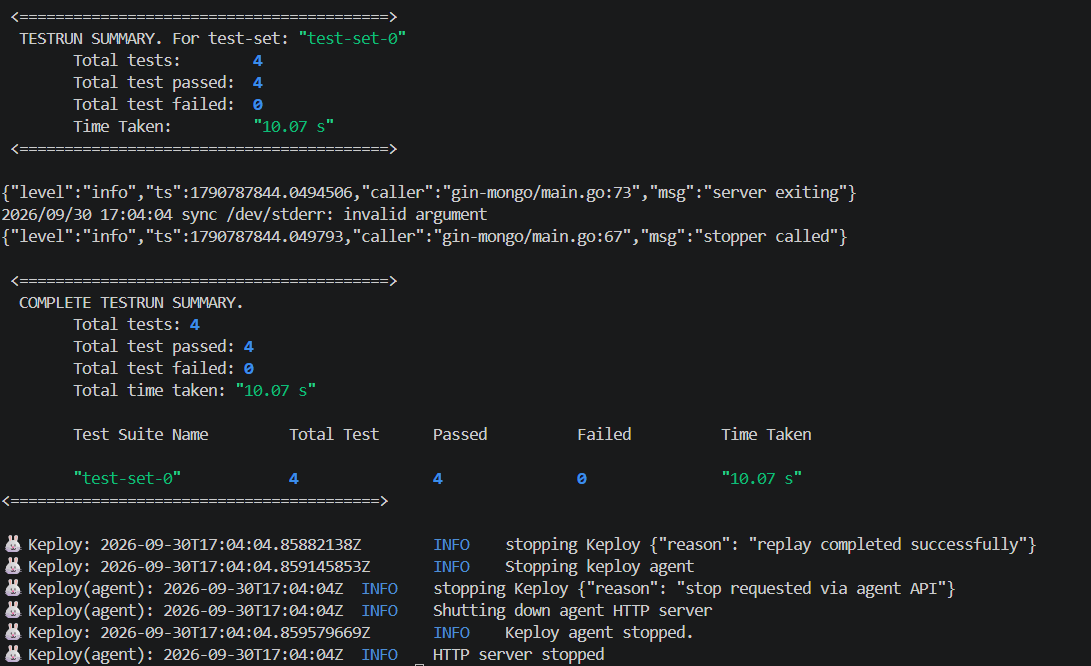
  TESTRUN SUMMARY. For test-set: test-set-0
	Total tests:        4
	Total test passed:  4
	Total test failed:  0
	Time Taken:         15.05 s
All four pass, even though the ts value in every response was different from the recording.
 Full size
Break something on purpose
Tests that always pass don't prove much. Let's make a change that looks harmless: rename the url key in the POST /url response to short_url, on line 98 of handler.go:
c.JSON(http.StatusOK, gin.H{
	"ts":        time.Now().UnixNano(),
	"short_url": "http://localhost:8080/" + id,
})
Replay again with the same keploy test command. This time Keploy shows exactly what changed, side by side:
Testrun failed for testcase with id: "post-url-1"
# table borders and padding trimmed
EXPECT HEADER | ACTUAL HEADER
Content-Length: [65] | Content-Length: [71]
EXPECT BODY | ACTUAL BODY
{ | {
"url": http://localhost:8080/Lhr4BWAi | "short_url": http://localhost:8080/Lhr4BWAi
} | }
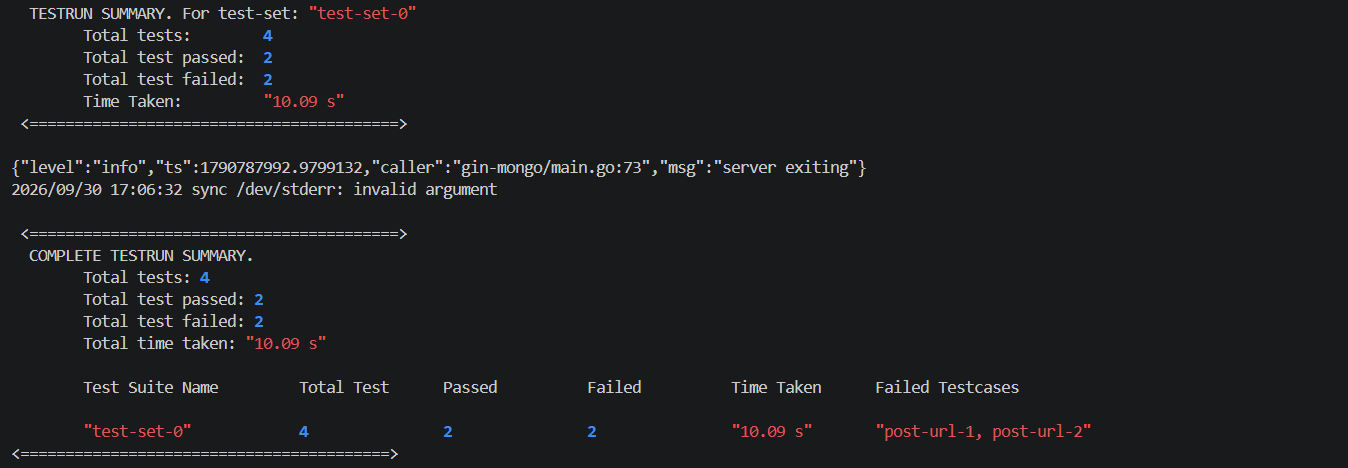
TESTRUN SUMMARY. For test-set: test-set-0
Total tests: 4
Total test passed: 2
Total test failed: 2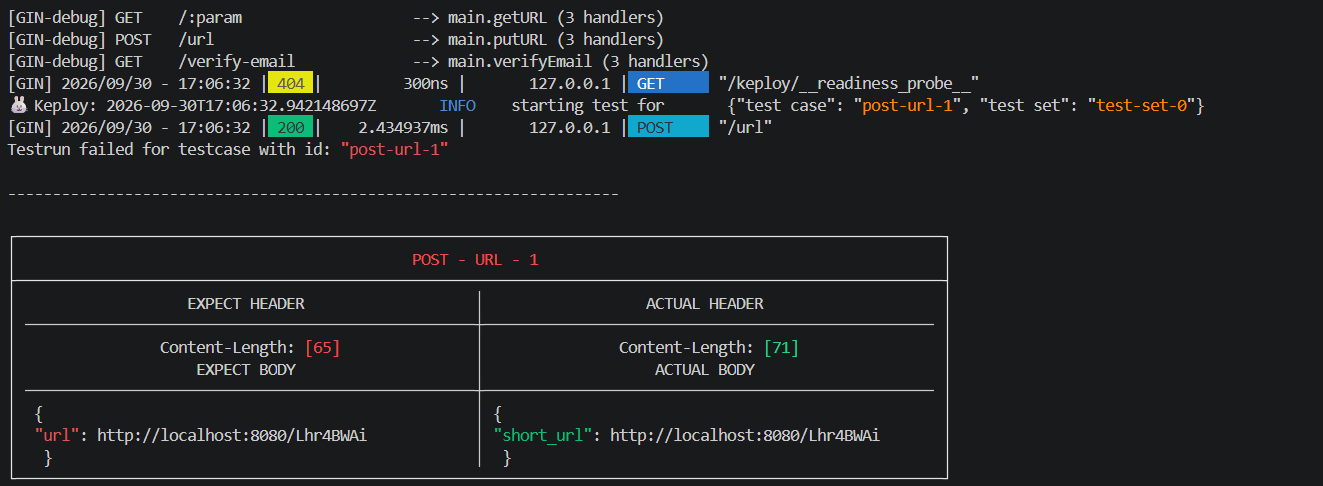 Full size
 Full size
Both POST tests fail and both GET tests still pass, which is exactly the blast radius of the change. The noisy ts field doesn't even appear in the diff.
This is the payoff: you never wrote an assertion, yet Keploy caught a renamed JSON field, the kind of "tiny refactor" that sails through code review and breaks every client reading url. Change the key back and the suite returns to 4/4.
Troubleshooting
Issues I hit
Other common issues
Where to go next
- Commit your tests. Keploy drops a
.gitignoreintokeploy/that excludes onlyreports/, so the tests and mocks are meant to live in your repo next to the code. - Run replay in CI. Because replay doesn't need the real database,
keploy testcan run in a pipeline on every pull request. - Explore further. The Keploy docs cover other Go frameworks and databases, plus how to tune which fields count as noise.
Recap
- Keploy turns real API traffic into test cases, and dependency calls into mocks.
keploy recordcaptures;keploy testreplays and compares.- Fields that change on every call, like timestamps, are detected as noise and ignored.
- Mocks mean replay works with the database switched off.
- A changed response shows up as a failing test with a clear expected-vs-actual diff, and you never wrote an assertion.
That's the loop: record once, replay on every change, re-record when the behaviour is meant to change.